
Fraction Calculator | Add, Subtract, Multiply & Simplify Fractions
Supports integers with 15+ digits.
The Ultimate Fraction Calculator Suite
Guide to Using These Calculators
We have combined four powerful tools into one page. Here is how to use each one effectively:
1. Mixed Number & Fraction Calculator
This is your daily driver for math problems. It handles Addition (+), Subtraction (-), Multiplication (×), and Division (÷) for both simple fractions and mixed numbers.
- How it works:
- Enter your Whole Numbers (optional), Numerators, and Denominators.
- Select your operator (
+,-,×,÷). - Click Calculate.
- Real World Example:
- Problem: You have 1 (1/2) cups of flour and add (2/3) of a cup more.
- Input: Set fraction 1 to
1 1/2and fraction 2 to0 2/3. Select+. - Result: The calculator finds the Least Common Denominator (LCD), converts to improper fractions (3/2 + 2/3), and outputs 2( 1/6).
2. Simplify Fractions Calculator
Use this tool to reduce large fractions to their simplest form (lowest terms). It uses the Greatest Common Divisor (GCD) algorithm.
- Example:
- Input:: 50/100
- Logic: Both numbers are divisible by 50.
- Result: 1/2
3. Decimal to Fraction Converter
Need to turn a decimal like 0.75 or 0.125 into a fraction? This tool analyzes the decimal places and converts them instantly.
- Example:
- Input:
0.375 - Process: The calculator reads three decimal places ($1000$), writes it as 375/1000, and reduces it.
- Result: 3/8
- Input:
4. Big Number Fraction Calculator
Standard calculators crash when you try to calculate fractions with 15 or 20 digits. Our Big Number Engine uses special logic to handle integers of almost infinite length without losing precision.
- Best For: Cryptography math, scientific data processing, and large-scale engineering calculations where rounding errors are not acceptable.
How to Calculate Fractions Manually
If you are a student showing your work, understanding the logic is key. Here is the math our calculator performs behind the scenes:
Adding & Subtracting Fractions
To add fractions with different denominators, you must find the Least Common Denominator (LCD).
- Step 1: Identify the denominators (e.g., 3 and 4).
- Step 2: Find the smallest number both divide into (12).
- Step 3: Multiply numerators to match the new base:1/3 + 1/4 = 4/12 + 3/12
- Step 4: Add the numerators:4+3/12 = 7/12
Multiplying Fractions
This is the simplest operation. You simply multiply straight across.
a/b X c/d = aXc/dXd
Dividing Fractions
To divide, you use the “Keep, Change, Flip” method:
Flip the second fraction (reciprocal).
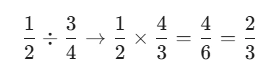
Keep the first fraction.
Change division to multiplication.