Hex Calculator | Hexadecimal Addition, Subtraction & Conversions
Hexadecimal Calculator
Hex to Decimal
Decimal to Hex
Related Calculator
Understanding the Hexadecimal System
The hexadecimal number system, often simply called hex, is a positional numeral system that uses a base of 16. While our everyday decimal system relies on ten digits (0–9), hexadecimal expands this inventory to accommodate sixteen distinct values.
To represent values from 10 to 15, hex employs the first six letters of the alphabet: A, B, C, D, E, and F. In this system, ‘A’ is equivalent to 10, while ‘F’ represents 15. This system is a cornerstone of modern computing because a single hex digit perfectly represents four binary digits (a nibble). This relationship allows developers and engineers to condense long, cumbersome strings of binary code into a human-readable format. For instance, the binary sequence 1010101010 is more efficiently managed as 2AA in hex.
Quick Reference: Hex, Binary, and Decimal Equivalents
| Hexadecimal | Binary | Decimal |
| 0 | 0000 | 0 |
| 5 | 0101 | 5 |
| 9 | 1001 | 9 |
| A | 1010 | 10 |
| B | 1011 | 11 |
| C | 1100 | 12 |
| D | 1101 | 13 |
| E | 1110 | 14 |
| F | 1111 | 15 |
| 10 | 0001 0000 | 16 |
How to Convert Between Hex and Decimal
Mastering hex requires comfort with switching between base-10 and base-16. The process is similar to binary conversion but uses powers of 16 instead of 2.
Converting Hex to Decimal
To find the decimal value of a hex number, multiply each digit by $16^n$, where $n$ is the position of the digit starting from 0 on the right.
Example: Convert 2AA to Decimal
- Identify positions: The rightmost ‘A’ is at 16^0, the second ‘A’ is at 16^1, and the ‘2’ is at 16^2.
- Substitute values: Remember that A = 10.
- Calculate:
Converting Decimal to Hex
This process involves finding the highest power of 16 that fits into your number and calculating remainders.
Example: Convert 1500 to Hex
- Find the largest power: 16^2 (256) is the largest power of 16 less than 1500.
- Divide: 1500 ÷ 256 = 5 with a remainder of 220. (First digit is 5).
- Next Power: 16^1 (16). 220 ÷ 16 = 13 with a remainder of 12.
- Final Remainder: The remaining 12 goes into the 16^0 place.
- Convert to Hex letters: 13 becomes D and 12 becomes C.
- Result: 5DC
Hexadecimal Arithmetic
Performing math in hex follows the same carries and borrows as decimal math, provided you remember that you are working in groups of 16.
Hex Addition
When the sum of a column exceeds 15, you must “carry the one” to the next column. The value carried represents one unit of 16.
Example: 81B + B78
- Right Column: B (11) + 8 = 19. Since 19 is greater than 15, subtract 16. 19 – 16 = 3. Carry the 1.
- Middle Column: 1 (carry) + 1 + 7 = 9.
- Left Column: 8 + B (11) = 19. Again, 19 – 16 = 3. Carry the 1.
- Final Result: 1393
Hex Subtraction
The trick to hex subtraction is the “borrow.” When you borrow from the left column, you aren’t adding 10 to your current digit; you are adding 16.
Example: 5DC – 3AF
- Right Column: C (12) minus F (15). Since 12 is smaller than 15, borrow from the D.
- Borrowing: D becomes C. The right column becomes 16 + 12 = 28.
- Calculate: 28 – 15 = 13, which is D.
- Next Column: C (12) – A (10) = 2.
- Left Column: 5 – 3 = 2.
- Final Result: 22D
Hex Multiplication and Division
Multiplication
Hex multiplication is often easiest performed by converting the specific digits to decimal, multiplying them, and then converting that specific product back to hex to determine what to write down and what to carry.
Division
Division in hex can be handled through “long division” mechanics. Most users find it more efficient to convert the hex values to decimal, perform the division, and convert the quotient back to hexadecimal format.
Need Help with a Calculation?
Our tool above automates these complex steps, providing you with instant results and a clear breakdown of the logic used. Whether you are debugging code or studying computer science, this hex calculator is designed to simplify your workflow.
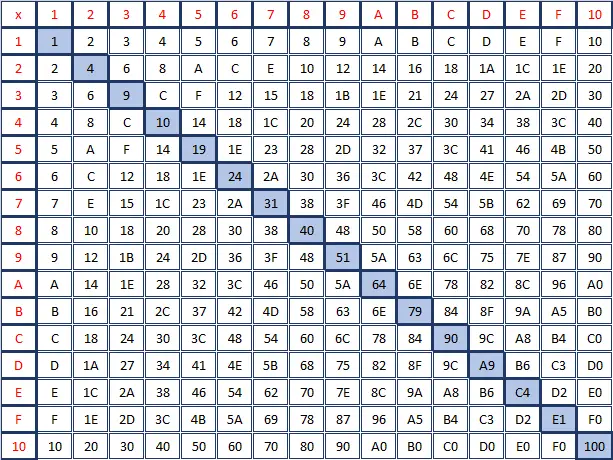
Hexadecimal Multiplication Table
Below is the full hexadecimal multiplication table for values 1 through 10 (decimal 16).
Hexadecimal Multiplication Table
Below is the full hexadecimal multiplication table for values 1 through 10 (decimal 16).